2011/05/25

The CPU usage Issue of Visual Studio 2010 on Windows 7 64bit

When I use Visual Studio 2010 editing a XMAL file, the cup usage climbs very high. My notebook equips  a dual core Intel T9400 processor. The Visual Studio 2010 will take about 50% of all cups. Look this picture.

5-25-2011 11-30-05

In the Resource Monitor, we can see the orange line, presents the cup usage of the devenv.exe. When I opened the project, it ate about 50%. And soon it went down, but when the XAML code displayed, it climbed high again.

And the second picture:

5-25-2011 11-37-02

I ran the very simple application and closed it. When Windows system’s focus back to Visual Studio 2010, the cup usage was about 50% for a while. When I captured this picture, it just started went down, we can see this in CPU list. The devenv.exe is 11%.

I tried the same code in my coworker’s Thinkpad W510, quad-core 8 threads. The highest usage is 15%. We should keep it mind that 50% in my 2 threads machine actually equals to 100% cpu usage on a single thread. And when 8 threads machine, 15% equals 100% on a single thread. The different is when Visual Studio 2010 eating my cpu, it is difficult to scroll down or up on the xaml editor. But 8 threads machine can scroll smooth.

I googled for a while. Somebody was reporting this issue on Microsoft bug report. But it seemed there was no official solution. Even I and my coworker have installed Visual Studio 2010 SP1, this issue still exist.

Why I say on “64bit” ? Because I usually develop my application in a VM which is Windows 7 32bit. And installed the same Visual Studio 2010 copy. The application had a more complex xaml structure than what’s on the picture above. But it dose not eat cup too much. So I wonder, this issue is Visual Studio 2010 did not perform well on Windows 7 “64bit” only.

If anyone have any solutions, or any thoughts about this issue. Tell me, please.

2011/02/24

[WPF] [C#] How-to : Detect if another application is running in full screen mode.

When an application is running in full screen mode, MSN Messenger can change your status to "Busy". Here are codes showed how to detect a application is running in full screen mode.

If you want to learn more, please read this article by Richard Banks. I copied the most part from his blog and then write my WPF sample.

using System;
using System.Collections.Generic;
using System.Linq;
using System.Text;
using System.Windows;
using System.Windows.Controls;
using System.Windows.Data;
using System.Windows.Documents;
using System.Windows.Input;
using System.Windows.Media;
using System.Windows.Media.Imaging;
using System.Windows.Navigation;
using System.Windows.Shapes;
using System.Runtime.InteropServices;
using System.Windows.Forms;
 
namespace IsAnotherApplicationFullScreen {
    /// <summary>
    /// Interaction logic for MainWindow.xaml
    /// </summary>
    public partial class MainWindow : Window {
 
        Timer timer;
        public MainWindow() {
            InitializeComponent();
            //
            // timer
            //
            timer = new Timer();
            timer.Interval = 500;
            timer.Tick += new EventHandler(timer_Tick);
        }
 
        void timer_Tick(object sender, EventArgs e) {
            label1.Content = ScreenDetectionn.AreApplicationFullScreen();
        }
 
        void button1_Click(object sender, RoutedEventArgs e) {
            timer.Start();
        }
    }
 
    [StructLayout(LayoutKind.Sequential)]
    public struct RECT {
        public int Left;
        public int Top;
        public int Right;
        public int Bottom;
    }
 
    public class ScreenDetectionn {
        [DllImport("user32.dll")]
        private static extern IntPtr GetForegroundWindow();
        [DllImport("user32.dll")]
        private static extern IntPtr GetDesktopWindow();
        [DllImport("user32.dll")]
        private static extern IntPtr GetShellWindow();
        [DllImport("user32.dll", SetLastError = true)]
        private static extern int GetWindowRect(IntPtr hwnd, out RECT rc);
 
        private static IntPtr desktopHandle;
        private static IntPtr shellHandle;
 
        public static bool AreApplicationFullScreen() {
            desktopHandle = GetDesktopWindow();
            shellHandle = GetShellWindow();
 
            bool runningFullScreen = false;
            RECT appBounds;
            System.Drawing.Rectangle screenBounds;
            IntPtr hWnd;
            hWnd = GetForegroundWindow();
 
            if (hWnd != null && !hWnd.Equals(IntPtr.Zero)) {
                if (!(hWnd.Equals(desktopHandle) || hWnd.Equals(shellHandle))) {
                    GetWindowRect(hWnd, out appBounds);
                    screenBounds = System.Windows.Forms.Screen.FromHandle(hWnd).Bounds;
                    if ((appBounds.Bottom - appBounds.Top) == screenBounds.Height
                        && (appBounds.Right - appBounds.Left) == screenBounds.Width) {
                        runningFullScreen = true;
                    }
                }
            }
 
            return runningFullScreen;
        }
    }
}
 

2011/02/23

[WPF] [C#] How-to : Make application blink in the taskbar like MSN Messenger dose.

Here are codes showed how to make the application blink in taskbar like MSN Messenger dose.

I have read a discussing thread at stackOverFlow. And then fit it into WPF version. The only different is how to get the handle of the current window. In Windows Forms, you can use this.Handle property to get it. In WPF, you have do it this way: new WindowInteropHelper(this).Handle. Be ware of using System.Runtime.InteropServices and System.Windows.Interop.

There are two buttons on the window. Click Button1 to start flash. Button2 for stopping. The only different is the fInfo.dwFlags property. 3 for starting flash. 0 for stopping.

Edit these codes to fit your scenario and wish you coding fun.

using System;

using System.Collections.Generic;

using System.Linq;

using System.Text;

using System.Windows;

using System.Windows.Controls;

using System.Windows.Data;

using System.Windows.Documents;

using System.Windows.Input;

using System.Windows.Media;

using System.Windows.Media.Imaging;

using System.Windows.Navigation;

using System.Windows.Shapes;

using System.Runtime.InteropServices;

using System.Windows.Interop;


namespace FlashTaskbar {

    /// <summary>

    /// Interaction logic for MainWindow.xaml

    /// </summary>

    public partial class MainWindow : Window {

        [DllImport("user32.dll")]

        [return: MarshalAs(UnmanagedType.Bool)]

        static extern bool FlashWindowEx(ref FLASHWINFO pwfi);


        [StructLayout(LayoutKind.Sequential)]

        public struct FLASHWINFO {

            public UInt32 cbSize;

            public IntPtr hwnd;

            public UInt32 dwFlags;

            public UInt32 uCount;

            public UInt32 dwTimeout;

        }


        public const UInt32 FLASHW_ALL = 3;


        public MainWindow() {

            InitializeComponent();

        }


        private void button1_Click(object sender, RoutedEventArgs e) {

            FLASHWINFO fInfo = new FLASHWINFO();


            fInfo.cbSize = Convert.ToUInt32(Marshal.SizeOf(fInfo));

            fInfo.hwnd = new WindowInteropHelper(this).Handle;

            fInfo.dwFlags = FLASHW_ALL;

            fInfo.uCount = UInt32.MaxValue;

            fInfo.dwTimeout = 0;


            FlashWindowEx(ref fInfo);

        }


        private void button2_Click(object sender, RoutedEventArgs e) {

            FLASHWINFO fInfo = new FLASHWINFO();


            fInfo.cbSize = Convert.ToUInt32(Marshal.SizeOf(fInfo));

            fInfo.hwnd = new WindowInteropHelper(this).Handle;

            fInfo.dwFlags = 0;

            fInfo.uCount = UInt32.MaxValue;

            fInfo.dwTimeout = 0;


            FlashWindowEx(ref fInfo);

        }

    }

}

2011/02/14

C#: How-to open a file using its default application.

Here is a code sample for opening a file by the default application in your OS.

string folder = AppDomain.CurrentDomain.BaseDirectory;
string pdf = "an_arcobat_pdf_file.pdf";
System.Diagnostics.ProcessStartInfo psi = new System.Diagnostics.ProcessStartInfo();
psi.FileName = pdf;
psi.WindowStyle = System.Diagnostics.ProcessWindowStyle.Maximized;
System.Diagnostics.Process.Start(psi);

2010/10/25

Why IE?

Because all browser can import IE favorites to their own bookmarks. That is why I always adding a bookmark with IE. And then zip the Favorite folder for backup. I find this is a easy way to migrate bookmarks from one pc to another.

Someone may suggest me using google’s online bookmarks. Ok, I’ll try now…

One minutes later. I give up google bookmarks. Because I could not update the url of a dead bookmark. Why can’t ? Google, please tell me!

IE, it will still be my most favorite for some reasons.

2010/09/17

Google docs hate Internet Explorer 9 beta

As you see. It is working well in Chrome not in IE9.

google docs hates IE9

2010/09/16

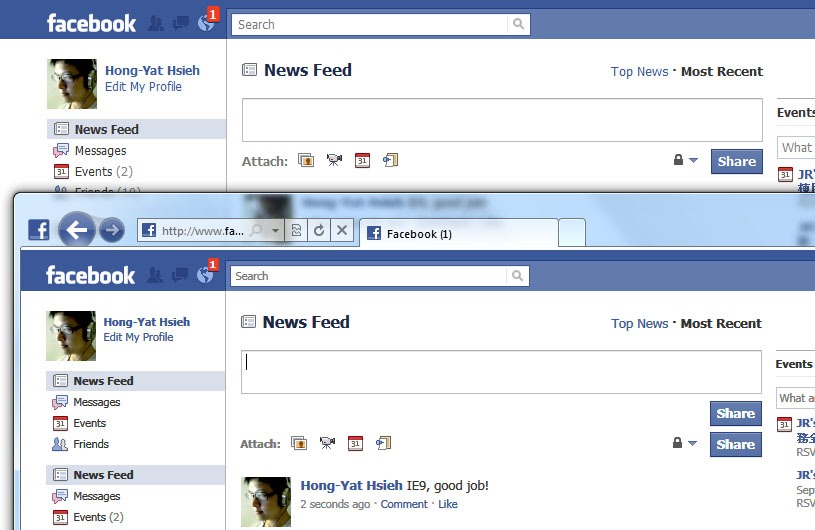
IE9, good job! But still some problems.

At facebook, see picture bellow. Two “Share” buttons appear at IE9 when writing wall post. Another is Google Chrome which is correct.

IE9-facebook