2011/02/23

[WPF] [C#] How-to : Make application blink in the taskbar like MSN Messenger dose.

Here are codes showed how to make the application blink in taskbar like MSN Messenger dose.

I have read a discussing thread at stackOverFlow. And then fit it into WPF version. The only different is how to get the handle of the current window. In Windows Forms, you can use this.Handle property to get it. In WPF, you have do it this way: new WindowInteropHelper(this).Handle. Be ware of using System.Runtime.InteropServices and System.Windows.Interop.

There are two buttons on the window. Click Button1 to start flash. Button2 for stopping. The only different is the fInfo.dwFlags property. 3 for starting flash. 0 for stopping.

Edit these codes to fit your scenario and wish you coding fun.

using System;

using System.Collections.Generic;

using System.Linq;

using System.Text;

using System.Windows;

using System.Windows.Controls;

using System.Windows.Data;

using System.Windows.Documents;

using System.Windows.Input;

using System.Windows.Media;

using System.Windows.Media.Imaging;

using System.Windows.Navigation;

using System.Windows.Shapes;

using System.Runtime.InteropServices;

using System.Windows.Interop;


namespace FlashTaskbar {

    /// <summary>

    /// Interaction logic for MainWindow.xaml

    /// </summary>

    public partial class MainWindow : Window {

        [DllImport("user32.dll")]

        [return: MarshalAs(UnmanagedType.Bool)]

        static extern bool FlashWindowEx(ref FLASHWINFO pwfi);


        [StructLayout(LayoutKind.Sequential)]

        public struct FLASHWINFO {

            public UInt32 cbSize;

            public IntPtr hwnd;

            public UInt32 dwFlags;

            public UInt32 uCount;

            public UInt32 dwTimeout;

        }


        public const UInt32 FLASHW_ALL = 3;


        public MainWindow() {

            InitializeComponent();

        }


        private void button1_Click(object sender, RoutedEventArgs e) {

            FLASHWINFO fInfo = new FLASHWINFO();


            fInfo.cbSize = Convert.ToUInt32(Marshal.SizeOf(fInfo));

            fInfo.hwnd = new WindowInteropHelper(this).Handle;

            fInfo.dwFlags = FLASHW_ALL;

            fInfo.uCount = UInt32.MaxValue;

            fInfo.dwTimeout = 0;


            FlashWindowEx(ref fInfo);

        }


        private void button2_Click(object sender, RoutedEventArgs e) {

            FLASHWINFO fInfo = new FLASHWINFO();


            fInfo.cbSize = Convert.ToUInt32(Marshal.SizeOf(fInfo));

            fInfo.hwnd = new WindowInteropHelper(this).Handle;

            fInfo.dwFlags = 0;

            fInfo.uCount = UInt32.MaxValue;

            fInfo.dwTimeout = 0;


            FlashWindowEx(ref fInfo);

        }

    }

}

2011/02/14

C#: How-to open a file using its default application.

Here is a code sample for opening a file by the default application in your OS.

string folder = AppDomain.CurrentDomain.BaseDirectory;
string pdf = "an_arcobat_pdf_file.pdf";
System.Diagnostics.ProcessStartInfo psi = new System.Diagnostics.ProcessStartInfo();
psi.FileName = pdf;
psi.WindowStyle = System.Diagnostics.ProcessWindowStyle.Maximized;
System.Diagnostics.Process.Start(psi);

2010/10/25

Why IE?

Because all browser can import IE favorites to their own bookmarks. That is why I always adding a bookmark with IE. And then zip the Favorite folder for backup. I find this is a easy way to migrate bookmarks from one pc to another.

Someone may suggest me using google’s online bookmarks. Ok, I’ll try now…

One minutes later. I give up google bookmarks. Because I could not update the url of a dead bookmark. Why can’t ? Google, please tell me!

IE, it will still be my most favorite for some reasons.

2010/09/17

Google docs hate Internet Explorer 9 beta

As you see. It is working well in Chrome not in IE9.

google docs hates IE9

2010/09/16

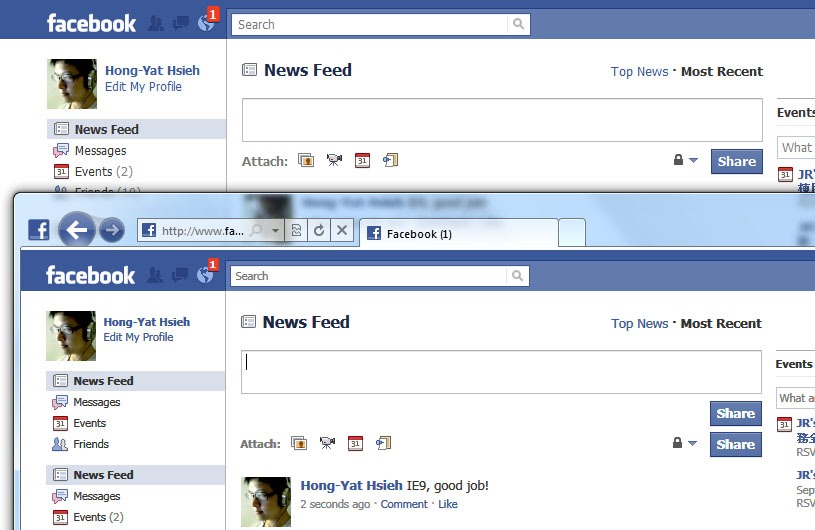
IE9, good job! But still some problems.

At facebook, see picture bellow. Two “Share” buttons appear at IE9 when writing wall post. Another is Google Chrome which is correct.

IE9-facebook

2010/08/31

WPF: Get the item in the ListView under the mouse cursor.

How to get the item in the ListView under the mouse cursor. These codes are gethered at CodeProject here.

// A ListView control named lv. Let’s do something in MouseDoubleClick event handler.
private void
lv_MouseDoubleClick(object sender, MouseButtonEventArgs e) {
    int index = GetCurrentIndex(e.GetPosition); 
    MyClass instance = lvUsers.Items[index] as MyClass
    // Now you got the original object and then do what you want. 
}
delegate Point GetPositionDelegate(IInputElement element);
private int GetCurrentIndex(GetPositionDelegate getPosition) {
    int index = -1;
    for (int i = 0; I < lv.Items.Count; i++) {
        ListViewItem item = GetListViewItem(i);
        if (item == null)
            continue;
        if (IsMouseOverTarget(item, getPosition)) {
            index = i;
            break;
        }
    }
    return index;
}
private ListViewItem GetListViewItem(int index) {
    if (lv.ItemContainerGenerator.Status != GeneratorStatus.ContainersGenerated)
    return null;
    return lv.ItemContainerGenerator.ContainerFromIndex(index) as ListViewItem;
}
private bool IsMouseOverTarget(Visual target, GetPositionDelegate getPosition) {
    Rect bounds = VisualTreeHelper.GetDescendantBounds(target);
    Point mousePos = getPosition((IInputElement)target); 
    return bounds.Contains(mousePos);
}

2010/08/30

WPF: Binding a ListView to DataTable

Suppose you have a DataTable filled with data. And want a ListView to present the data. This code sample can help you.

XAML

<ListView Name="lv">
    <ListView.View>
        <GridView>
        </GridView>
    </ListView.View>
</ListView>

C#

string tableName = “some_table_name”;
DataSet ds = Dao.GetData(tableName);  // A class to retrieve dataset.
if (ds.Tables == null || ds.Tables.Count == 0)
    return;

GridView gv = (GridView)lv.View;

DataTable dt = ds.Tables[0];
foreach (DataColumn col in dt.Columns) {
    GridViewColumn gvCol = new GridViewColumn();
    gvCol.Header = col.ColumnName;
    gvCol.DisplayMemberBinding = new Binding(col.ColumnName);
    gvCol.Width = 100;
    gv.Columns.Add(gvCol);
}

lv.ItemsSource = ((IListSource)dt).GetList();