2018/01/18

使用 using IDisposable 物件包裝 Stopwatch 並可自訂 log 處理動作

受到黑暗執行序一篇文章《野人獻曝 - 極簡風格 .NET Stopwatch 計時法》的啟發,我延伸了一點小小的功能,讓寫 log 的動作更有彈性一點。原文使用 IDisposable 物件包裝 Stopwatch,在程式碼中以 using 方式使用,在大括號內自動計時,並且在結束的時候寫出 log 內容。在實作 DIspose() 時示範加入 Console.WriteLine 寫出 log 資訊。但如果使用的情境,不一定是要在 Console 或 log 檔案輸出資訊的話呢? 可能是在視窗畫面上顯示資訊。為了達成這樣的目的,我作了小小的修改,在建構子傳入 Action<Stopwatch> 委派,日後就可以依需求自訂 log 處理動作。

/// <summary>
/// 以 using 方式包裝 Stopwatch 提供監看程式耗時的功能
/// </summary>

public class StopwatchScope : IDisposable {         
    private readonly Stopwatch stopwatch = new Stopwatch();
    private Action<Stopwatch> proc;         

    /// <summary>           
    /// 是否停用           
    /// </summary>
         
    public static bool Disabled { get; set; } = false;

    /// <summary>
    /// 建構式
    /// </summary>

    /// <param name="stopwatchProcess">StopwatchScope dispose 時候要執行的動作</param>
    public StopwatchScope(Action<Stopwatch> stopwatchProcess) {
        if (Disabled) return;
        proc = stopwatchProcess;
        stopwatch.Start();
    }
 
    /// <inheritdoc />
    public void Dispose() {
        if (Disabled) return;
        stopwatch.Stop();
        if (proc != null) proc.Invoke(stopwatch);
    }
}

使用起來大概像這樣,假設我們有個 Logger 物件專門寫 log 檔案,在 using 建立 StopwatchScope 時,可以傳入寫 log 的方法。

using (StopwatchScope sw = new StopwatchScope(w => {Logger.Write("do something 花費秒數: " + w.Elapsed.TotalSeconds.ToString());}) {
    // do something
}

呼叫 Logger 寫檔案,也可以替換成更新 Windows UI 某個 label 的內容或是 status bar 的資訊,如此就可以自訂 log 處理動作。

2015/04/11

Error message “The definition of the report '' is invalid” when opening a report in Windows Forms ReportViewer.


In the brief

I developed a Windows Forms application. There is a ReportViewer control to show some reports. The reports showed up well on my develop machine, but got error message on deployment machine. I finally found that the deployment machine was lack of some assemblies which ReportViewer needs.

Error Message Log

[Error] Message = An error occurred during local report processing. 
   at Microsoft.Reporting.WinForms.LocalReport.EnsureExecutionSession() 
   at Microsoft.Reporting.WinForms.LocalReport.SetParameters(IEnumerable`1 parameters)


[Error] Message = The definition of the report '' is invalid
   at Microsoft.Reporting.ReportCompiler.CompileReport(ICatalogItemContext context, Byte[] reportDefinition, Boolean generateExpressionHostWithRefusedPermissions, ControlSnapshot& snapshot) 
   at Microsoft.Reporting.LocalService.GetCompiledReport(PreviewItemContext itemContext, Boolean rebuild, ControlSnapshot& snapshot) 
   at Microsoft.Reporting.LocalService.CompileReport() 
   at Microsoft.Reporting.LocalService.Microsoft.Reporting.ILocalProcessingHost.CompileReport() 
   at Microsoft.Reporting.WinForms.LocalReport.EnsureExecutionSession(), Source = Microsoft.ReportViewer.Common, Method = CompileReport


ReporViewer assemblies

In my case, my project is reference Microsoft.ReportViewer.WinForms.dll version 11.0.0.0. All assemblies you need to copy to deployment machine are:

  • Microsoft.ReportViewer.Common.dll
  • Microsoft.ReportViewer.ProcessingObjectModel.dll
  • Microsoft.ReportViewer.WinForms.dll
  • Microsoft.SqlServer.Types.dll

You can find them in c:\windows\assembly\GAC_MSIL\ . Every assembly has its own folder and subfolder of different version.

How I find out the solution

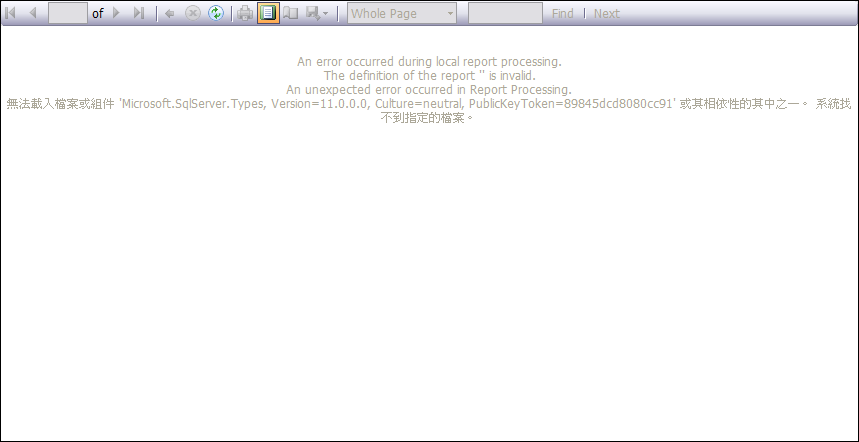
I create an empty report. No parameters, no data source. And open it on deployment machine. Then, I saw the message on ReportViewer as showed below. The message says it needs other assembly to process report.

reportviewer

After I copied Microsoft.SqlServer.Types.dll to my application folder on the deployment machine. It showed next message that it want Microsoft.ReportViewer.ProcessingObjectModel.dll. And then copy it. Finally an empty report showed up. So I change my code to open the normal report which it was be. It works! All reports show up well on deployment machine now.

Final thoughts

Usually I only copy Microsoft.ReportViewer.Common.dll and Microsoft.ReportViewer.WinForms.dll to deployment machine when using ReportViewer version 10. This time I changed my ReportViewer to version 11 and got this error message “The definition of the report '' is invalid”. I googled everywhere but no useful solution for my case. Although someone mentioned it was ReportViewer version issue. But I still don’t know what’s the key point about version issue or what assembly missed in my application. Well, if you has the same problem, report works well on develop machine but not on deployment machine, try this solution.

2014/07/01

Why not Surface OS ?

微軟在 Windows 8 強推 Metro UI,卻因為使用者無法適應而導致 Windows 8 評價不高。而 Google 即將推出的 Android L 在我眼裡,卻是真正實踐 Windows 8 人機互動願景的作業環境。簡潔,專注,資訊能夠有效傳達的順暢使用體驗。

Google 讓大家慢慢接受 Android,一路從手機平板慢慢進擊到桌面運算設備。微軟卻仍得不斷挑戰自己一手建立的,怠惰、安於現狀、自我滿足、不敢跳出舒適圈的廣大 Windows 用戶。Windows Vista 想大跳躍卻跌得重重的,Windows 8 也被認為即將步上 Vista 的後塵。

其實,Windows 8 的失策,是沒有殺手級裝置搭配。這也一直是 PC 市場會萎縮的原因。整個 PC 市場都以製造業的角度在做電腦,Apple 卻從 iPod、iPhone、iPad 一路為使用者對於運算裝置帶來不同以往的使用體驗。

在我眼裡,Surface Pro 是市面上最能完整提供 Windows 8 使用體驗的裝置,若時光倒移,我覺得微軟該直接發表 Surface Pro 產品,並且將 OS 名稱定為 Surface OS。而 Surface OS 中有一個可以執行完整 Windows 7 App 的 Desktop 的環境。然後,下一個 Windows 版本推出的時候,同步免費提供新版 Surface OS。

並且,暫時不要讓 PC 用戶使用 Surface OS。直到哪些沒有創新力的 PC 廠商,終於也想要認真做觸控裝置的時候,推行 "微軟觸控裝置認證" ,通過認證的電腦,才可以安裝 Surface OS。以避免一堆觸控導向的程式,在鍵盤滑鼠的傳統操作方式下,顯得格格不入,而敗壞 Surface OS 的名聲。

微軟抱著 Windows 太久了,腦袋也和不能接受 "Windows 長的不像 Windows" 的客戶一樣,同樣的東西,換個名字,轉個角度,就能變成美好的生活體驗。

2014/05/27

程式錯誤經驗談:產生列表項目時,每一筆都向 Database 取時間

今天犯了個錯誤,在 ListView 填入資料時,因為要檢查資料日期是否逾時,必須以 Database 的時間為基準,所以在產生每一個 ListVieweItem 的時候,都向 Database 取時間,使得畫面顯示列表的時間拖得非常久。

最初,程式裡面使用 DateTime.Now 為基準,但客戶要求不可以使用 client 電腦的時間,以免 user 自己改到電腦時間。因此,我寫了一個全域的 ServerDate 方法向 Database 取得時間,然後把程式裡面所有 DateTime.Now 取代成 ServerDate 方法。當然包含了產生列表這一段,小小的災難就這樣發生了。

主管安慰我,說一定是後來因為客戶要求,臨時改掉原來的程式,才會令人疏忽,發生這樣的問題。的確,這是個無心之過。但! 身為一個程式設計師,應該對使用 Database 的資源充滿警覺性。

後來,小小改了一下,程式效能變得 40 幾倍快。哀~ 要小心。

2013/10/22

Visual Studio 2013 can download now. BUT where is my license?

VS2013 was released at Oct.17, 2013. I download it from MSDN Subscription. After installed vs2013, I can’t get my license. I used vs2013 from preview version to RC. I don’t know the license information showed in the screen, “Prerelease software”, is any matters ? It is strange. How do developers get valid license in my company ?

image

2012/07/04

[WPF] Asynchronously Loading Image From Internet using C# 5.0 (.NET Framework 4.5)


Requirement

I want to create a WPF window which displays many images from internet. I put many <Image> element on the window and set the Source of every <Image>. When I run the application, the UI is locked till all images loaded completely. This, UI locked, is not what I want. Is there any way to load image asynchronously?

Old Implement by ThreadPool

Then, an idea come to my head: make a user control and load image in another thread. My first implement use ThreadPool, Dispather to achieve this goal. But that is not the point of this article.

C# 5.0 and .NET Framework 4.5 do more for you

Recently I read that C# 5.0 introduced new keyword async and await. It make asynchronous programming simple. So I want to take a try. And I just want to share with you what I found.

The markup of <AsyncImage>

I create a user control named AsyncImage and put an Image element named “img” inside. The xaml is very simple.

<UserControl ...>
  <Grid>
    <Image name="img" />
  </Grid>
</UserControl>

As it is a control that can be put on the UI. I want to set the image source string when using it. Therefor I add a dependency property into the code.

public string ImageSource {
    get { return (string)GetValue(ImageSourceProperty); }
    set { SetValue(ImageSourceProperty, value); }
}

public static readonly DependencyProperty ImageSourceProperty =
    DependencyProperty.Register("ImageSource", typeof(string), typeof(AsyncImage), new UIPropertyMetadata("", OnImageSourceChanged));

When ImageSouce is set, it will call OnImageSourceChanged. It looks like this.

private static void OnImageSourceChanged(DependencyObject d, DependencyPropertyChangedEventArgs e) {
    AsyncImage v = d as AsyncImage;
    if (v == null)
        return;

    v.ShowImageAsync(e.NewValue.ToString());
}

The key word async And await

Let’s see the rest codes.

protected async void ShowImageAsync(string source) {
    img.Source = await LoadImageSourceAsync(source);
}

private async Task<ImageSource> LoadImageSourceAsync(string address) {
    ImageSource imgSource = null;

    try {
        MemoryStream ms = new MemoryStream(await new WebClient().DownloadDataTaskAsync(new Uri(address)));
        ImageSourceConverter imageSourceConverter = new ImageSourceConverter();
        imgSource = (ImageSource)imageSourceConverter.ConvertFrom(ms);

    } catch (Exception ex) {
        Debug.WriteLine(ex.Message);
        Debug.WriteLine(ex.StackTrace);
    }

    return imgSource;
}

ShowImageAsync is a void method modified by async keyword. Because there is a await call in the method block. 

LoadImageSource is another asynchronous method. It downloads the image by await call to WebClent.DownloadDataTaskAsync. WebClient class in .Net Framework 4.5 adds several asynchronous method which adding the word, “Async”, behind the original method name. The new method of the WebClient is the key point. It can do works in the background and return value when works completed. When I set img.Source by await call to LoadImageSourceAsync, it will do its works in the background, too.

I put AsyncImage in a test window. When downloading image, the window can still drag, move, change size. Only one thing. UI will still be locked in a very short time when Image.ImageSource is setting.

Responsive UI is easy

With async and await, asynchronous method call is like normal method. It reduced the cross thread call exceptions. A high performance and responsive UI is more and more easy.

2011/07/26

我的資訊觀察 : 平板電腦崛起後, 受惠者是... 顯示器.

我已經開始想像在不遠的未來 (就是明年 2012 年), 更多性能強大的平板上市後, 桌面上的裝置會是個怎麼樣的情景.

一個具有四核心, 64G 快閃記憶體硬碟的 7" 平版運行 Windows 8 作業系統, 效能接近我目前的 NB, 放在桌面上使用時, 會接一個 dock, dock 連接了鍵盤滑鼠等週邊, 還有 Lightpeak 連接的儲存裝置 (至少 2TB) 與 "外接顯卡", 使用 24" Full HD 雙螢幕輸出 (7" 加上 24""). 7" 螢幕顯示 Metro 介面, 當成純平版的樣子, 輸出到 24" 的螢幕是傳統 Winddows 畫面, 可以執行我現在做的一般事物 : 開 VM, 寫程式, 聽音樂.

離開桌面 (下班) 就把平板拔下來, dock 包一包放進袋子裡, 通勤時拿著 7" 小螢幕看雜誌, 小說. 回到家一樣放回 dock 上, 在書房就接電腦顯示器, 到客廳就接電視.

若照我這想像的樣子, 在一天的生活中, 這部平板會接觸到三部顯示裝置, 可見顯示器需求應該會增加的.

2011/05/25

The CPU usage Issue of Visual Studio 2010 on Windows 7 64bit

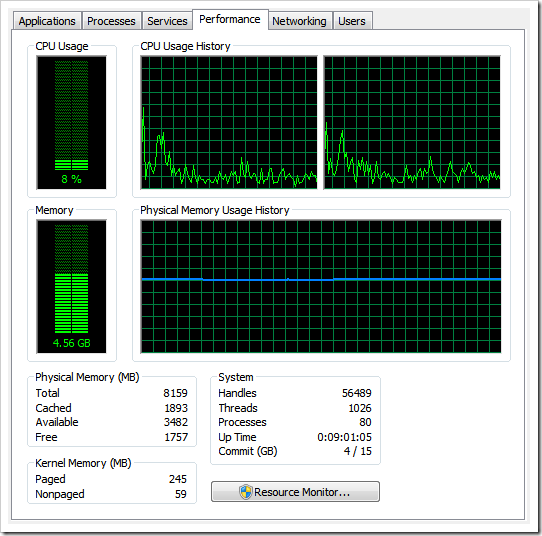
When I use Visual Studio 2010 editing a XMAL file, the cup usage climbs very high. My notebook equips  a dual core Intel T9400 processor. The Visual Studio 2010 will take about 50% of all cups. Look this picture.

5-25-2011 11-30-05

In the Resource Monitor, we can see the orange line, presents the cup usage of the devenv.exe. When I opened the project, it ate about 50%. And soon it went down, but when the XAML code displayed, it climbed high again.

And the second picture:

5-25-2011 11-37-02

I ran the very simple application and closed it. When Windows system’s focus back to Visual Studio 2010, the cup usage was about 50% for a while. When I captured this picture, it just started went down, we can see this in CPU list. The devenv.exe is 11%.

I tried the same code in my coworker’s Thinkpad W510, quad-core 8 threads. The highest usage is 15%. We should keep it mind that 50% in my 2 threads machine actually equals to 100% cpu usage on a single thread. And when 8 threads machine, 15% equals 100% on a single thread. The different is when Visual Studio 2010 eating my cpu, it is difficult to scroll down or up on the xaml editor. But 8 threads machine can scroll smooth.

I googled for a while. Somebody was reporting this issue on Microsoft bug report. But it seemed there was no official solution. Even I and my coworker have installed Visual Studio 2010 SP1, this issue still exist.

Why I say on “64bit” ? Because I usually develop my application in a VM which is Windows 7 32bit. And installed the same Visual Studio 2010 copy. The application had a more complex xaml structure than what’s on the picture above. But it dose not eat cup too much. So I wonder, this issue is Visual Studio 2010 did not perform well on Windows 7 “64bit” only.

If anyone have any solutions, or any thoughts about this issue. Tell me, please.

2011/02/24

[WPF] [C#] How-to : Detect if another application is running in full screen mode.

When an application is running in full screen mode, MSN Messenger can change your status to "Busy". Here are codes showed how to detect a application is running in full screen mode.

If you want to learn more, please read this article by Richard Banks. I copied the most part from his blog and then write my WPF sample.

using System;
using System.Collections.Generic;
using System.Linq;
using System.Text;
using System.Windows;
using System.Windows.Controls;
using System.Windows.Data;
using System.Windows.Documents;
using System.Windows.Input;
using System.Windows.Media;
using System.Windows.Media.Imaging;
using System.Windows.Navigation;
using System.Windows.Shapes;
using System.Runtime.InteropServices;
using System.Windows.Forms;
 
namespace IsAnotherApplicationFullScreen {
    /// <summary>
    /// Interaction logic for MainWindow.xaml
    /// </summary>
    public partial class MainWindow : Window {
 
        Timer timer;
        public MainWindow() {
            InitializeComponent();
            //
            // timer
            //
            timer = new Timer();
            timer.Interval = 500;
            timer.Tick += new EventHandler(timer_Tick);
        }
 
        void timer_Tick(object sender, EventArgs e) {
            label1.Content = ScreenDetectionn.AreApplicationFullScreen();
        }
 
        void button1_Click(object sender, RoutedEventArgs e) {
            timer.Start();
        }
    }
 
    [StructLayout(LayoutKind.Sequential)]
    public struct RECT {
        public int Left;
        public int Top;
        public int Right;
        public int Bottom;
    }
 
    public class ScreenDetectionn {
        [DllImport("user32.dll")]
        private static extern IntPtr GetForegroundWindow();
        [DllImport("user32.dll")]
        private static extern IntPtr GetDesktopWindow();
        [DllImport("user32.dll")]
        private static extern IntPtr GetShellWindow();
        [DllImport("user32.dll", SetLastError = true)]
        private static extern int GetWindowRect(IntPtr hwnd, out RECT rc);
 
        private static IntPtr desktopHandle;
        private static IntPtr shellHandle;
 
        public static bool AreApplicationFullScreen() {
            desktopHandle = GetDesktopWindow();
            shellHandle = GetShellWindow();
 
            bool runningFullScreen = false;
            RECT appBounds;
            System.Drawing.Rectangle screenBounds;
            IntPtr hWnd;
            hWnd = GetForegroundWindow();
 
            if (hWnd != null && !hWnd.Equals(IntPtr.Zero)) {
                if (!(hWnd.Equals(desktopHandle) || hWnd.Equals(shellHandle))) {
                    GetWindowRect(hWnd, out appBounds);
                    screenBounds = System.Windows.Forms.Screen.FromHandle(hWnd).Bounds;
                    if ((appBounds.Bottom - appBounds.Top) == screenBounds.Height
                        && (appBounds.Right - appBounds.Left) == screenBounds.Width) {
                        runningFullScreen = true;
                    }
                }
            }
 
            return runningFullScreen;
        }
    }
}
 

2011/02/23

[WPF] [C#] How-to : Make application blink in the taskbar like MSN Messenger dose.

Here are codes showed how to make the application blink in taskbar like MSN Messenger dose.

I have read a discussing thread at stackOverFlow. And then fit it into WPF version. The only different is how to get the handle of the current window. In Windows Forms, you can use this.Handle property to get it. In WPF, you have do it this way: new WindowInteropHelper(this).Handle. Be ware of using System.Runtime.InteropServices and System.Windows.Interop.

There are two buttons on the window. Click Button1 to start flash. Button2 for stopping. The only different is the fInfo.dwFlags property. 3 for starting flash. 0 for stopping.

Edit these codes to fit your scenario and wish you coding fun.

using System;

using System.Collections.Generic;

using System.Linq;

using System.Text;

using System.Windows;

using System.Windows.Controls;

using System.Windows.Data;

using System.Windows.Documents;

using System.Windows.Input;

using System.Windows.Media;

using System.Windows.Media.Imaging;

using System.Windows.Navigation;

using System.Windows.Shapes;

using System.Runtime.InteropServices;

using System.Windows.Interop;


namespace FlashTaskbar {

    /// <summary>

    /// Interaction logic for MainWindow.xaml

    /// </summary>

    public partial class MainWindow : Window {

        [DllImport("user32.dll")]

        [return: MarshalAs(UnmanagedType.Bool)]

        static extern bool FlashWindowEx(ref FLASHWINFO pwfi);


        [StructLayout(LayoutKind.Sequential)]

        public struct FLASHWINFO {

            public UInt32 cbSize;

            public IntPtr hwnd;

            public UInt32 dwFlags;

            public UInt32 uCount;

            public UInt32 dwTimeout;

        }


        public const UInt32 FLASHW_ALL = 3;


        public MainWindow() {

            InitializeComponent();

        }


        private void button1_Click(object sender, RoutedEventArgs e) {

            FLASHWINFO fInfo = new FLASHWINFO();


            fInfo.cbSize = Convert.ToUInt32(Marshal.SizeOf(fInfo));

            fInfo.hwnd = new WindowInteropHelper(this).Handle;

            fInfo.dwFlags = FLASHW_ALL;

            fInfo.uCount = UInt32.MaxValue;

            fInfo.dwTimeout = 0;


            FlashWindowEx(ref fInfo);

        }


        private void button2_Click(object sender, RoutedEventArgs e) {

            FLASHWINFO fInfo = new FLASHWINFO();


            fInfo.cbSize = Convert.ToUInt32(Marshal.SizeOf(fInfo));

            fInfo.hwnd = new WindowInteropHelper(this).Handle;

            fInfo.dwFlags = 0;

            fInfo.uCount = UInt32.MaxValue;

            fInfo.dwTimeout = 0;


            FlashWindowEx(ref fInfo);

        }

    }

}

2011/02/14

C#: How-to open a file using its default application.

Here is a code sample for opening a file by the default application in your OS.

string folder = AppDomain.CurrentDomain.BaseDirectory;
string pdf = "an_arcobat_pdf_file.pdf";
System.Diagnostics.ProcessStartInfo psi = new System.Diagnostics.ProcessStartInfo();
psi.FileName = pdf;
psi.WindowStyle = System.Diagnostics.ProcessWindowStyle.Maximized;
System.Diagnostics.Process.Start(psi);

2010/10/25

Why IE?

Because all browser can import IE favorites to their own bookmarks. That is why I always adding a bookmark with IE. And then zip the Favorite folder for backup. I find this is a easy way to migrate bookmarks from one pc to another.

Someone may suggest me using google’s online bookmarks. Ok, I’ll try now…

One minutes later. I give up google bookmarks. Because I could not update the url of a dead bookmark. Why can’t ? Google, please tell me!

IE, it will still be my most favorite for some reasons.

2010/09/17

Google docs hate Internet Explorer 9 beta

As you see. It is working well in Chrome not in IE9.

google docs hates IE9

2010/09/16

IE9, good job! But still some problems.

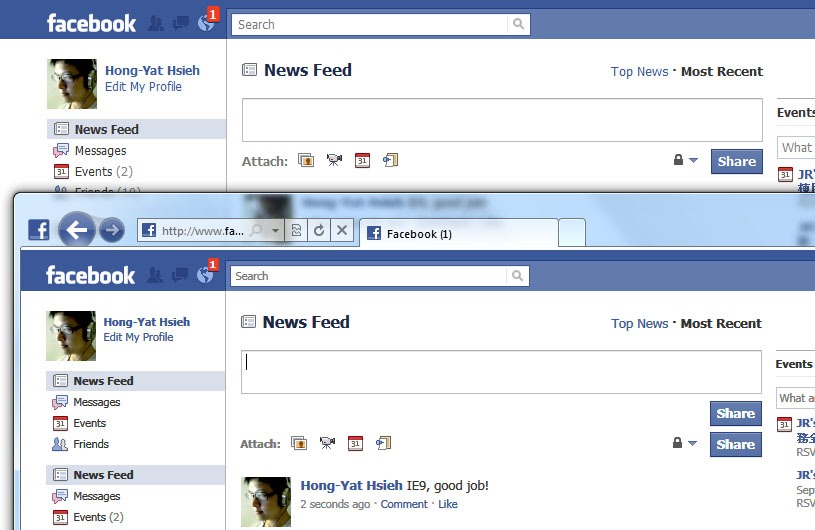
At facebook, see picture bellow. Two “Share” buttons appear at IE9 when writing wall post. Another is Google Chrome which is correct.

IE9-facebook

2010/08/31

WPF: Get the item in the ListView under the mouse cursor.

How to get the item in the ListView under the mouse cursor. These codes are gethered at CodeProject here.

// A ListView control named lv. Let’s do something in MouseDoubleClick event handler.
private void
lv_MouseDoubleClick(object sender, MouseButtonEventArgs e) {
    int index = GetCurrentIndex(e.GetPosition); 
    MyClass instance = lvUsers.Items[index] as MyClass
    // Now you got the original object and then do what you want. 
}
delegate Point GetPositionDelegate(IInputElement element);
private int GetCurrentIndex(GetPositionDelegate getPosition) {
    int index = -1;
    for (int i = 0; I < lv.Items.Count; i++) {
        ListViewItem item = GetListViewItem(i);
        if (item == null)
            continue;
        if (IsMouseOverTarget(item, getPosition)) {
            index = i;
            break;
        }
    }
    return index;
}
private ListViewItem GetListViewItem(int index) {
    if (lv.ItemContainerGenerator.Status != GeneratorStatus.ContainersGenerated)
    return null;
    return lv.ItemContainerGenerator.ContainerFromIndex(index) as ListViewItem;
}
private bool IsMouseOverTarget(Visual target, GetPositionDelegate getPosition) {
    Rect bounds = VisualTreeHelper.GetDescendantBounds(target);
    Point mousePos = getPosition((IInputElement)target); 
    return bounds.Contains(mousePos);
}

2010/08/30

WPF: Binding a ListView to DataTable

Suppose you have a DataTable filled with data. And want a ListView to present the data. This code sample can help you.

XAML

<ListView Name="lv">
    <ListView.View>
        <GridView>
        </GridView>
    </ListView.View>
</ListView>

C#

string tableName = “some_table_name”;
DataSet ds = Dao.GetData(tableName);  // A class to retrieve dataset.
if (ds.Tables == null || ds.Tables.Count == 0)
    return;

GridView gv = (GridView)lv.View;

DataTable dt = ds.Tables[0];
foreach (DataColumn col in dt.Columns) {
    GridViewColumn gvCol = new GridViewColumn();
    gvCol.Header = col.ColumnName;
    gvCol.DisplayMemberBinding = new Binding(col.ColumnName);
    gvCol.Width = 100;
    gv.Columns.Add(gvCol);
}

lv.ItemsSource = ((IListSource)dt).GetList();

2010/06/11

Use WCF to upload image data within a class

Here is a workable sample of uploading image data by WCF.

Requirement:

I have a data model includes image. I want to upload it from client to server.

History:

It was a case in tabular model days. I serialize dataset to a xml file and zip the image file together.  Then upload the zip file to a FTP server. And server side programs will get the zip file in the ftp folder.

Issues:

When uploading files via FTP, I did not know the transfer result. Some times the zip file was broken, but I won't know until server sent an error report to me. Maybe add a md5 check will be good. But even md5 check solve the issue of the broken file. It still need me to do something manually to make the client upload files again. I want the client know uploading result in the meantime. And client can upload again if there is a problem.

Possible Solution:

First, I considered Web Services. But in the final I turned into WCF. Because it can host a service on any processes without a web server. I am not sure WCF is the best way for me. But it dose help me.

Studies:

I list these articles which help me to achieve the goal.

WCF Streaming: Upload files over HTTP by Kjell-Sverre Jerijærvi (February 07, 2007).
How to: Enable Streaming, MSDN.
XML Serialization in C# - Part II – Images by Prajna Das (March 29, 2007).
"There is an error in XML document (0, 0)." error while XML Deserialization, MSDN Data Developer Center Forum.

My first question is how to upload files with WCF. People will suggest you using “Streamed” transfer mode. But many samples I googled, the service only provide a method to receive Stream. What if I want to pass a class instance? Finally I figured out that serialize my class into stream and transfer to server.

The second question is how to serialize images. The article “XML Serialization in C#” listed above give me a thought that Bitmap is hard to handle. I am lazy and not smart, so I want the code is as simple as possible. Then I remembered a project which I participated around 2005. One program in that project has a function: save image to xml file. Lucky I could find that project beside my hand.

Everything is ready. Let’s look how to implement my solution.

Implement I: XML Serialization

In the first, I want to transfer a image data within a class. The data model is:

public class ImageData {
    public string Id { get; set; }
    [XmlElementAttribute(DataType = "base64Binary")]
    public byte[] ImageContent { get; set; }
}

You may notice that the ImageContent property is byte[]. And I added a attribute above it to tell Serializer how to serialize it. Here is a SerializeHelper class handles serialize and deserialize.

public class SerializeHelper {
    public static void Serialize<T>(out Stream stream, T item){
        stream = new MemoryStream();
        XmlSerializer x = new XmlSerializer(typeof(T));
        x.Serialize(stream, item);
        stream.Position = 0;   
    }

    public static T Deserialize<T>(Stream stream) {
        XmlSerializer x = new XmlSerializer(typeof(T));
        T obj = (T)x.Deserialize(stream);
        return obj;
    }
}

The last line of the method, Serialize, is very important. If you did not set the position to 0, you will encounter a exception when deserialize: “There is an error in XML document (0, 0)”. For more information, you can read the article I listed above to learn what happened.

Implement II: WCF service

The service is very simple.

[ServiceContract]
public interface IImageServer {
    [OperationContract]
    Stream GetStream(string data);

    [OperationContract]
    bool UploadStream(Stream stream);
}

Just as the same as MSDN sample. How do I implement it ? See this:

[ServiceBehavior(InstanceContextMode = InstanceContextMode.Single)]
public class PictureServer : IPictureServer {
    public System.IO.Stream GetStream(string data) {
        try {
            ImageData item = new ImageData();
            item.Id = "001";
            item.ImageContent = File.ReadAllBytes(@"c:\temp\001.tif");

            Stream stream = null;
            SerializeHelper.Serialize<ImageData>(out stream, item);
            return stream;

        } catch (Exception ex) {
            Console.Write(ex.Message);
            return null;
        }
    }
   public bool UploadStream(Stream stream) {
        if (stream == null)
        return false;
    
        try {
            ImageData item = SerializeHelper.Deserialize<ImageData>(stream);
            File.WriteAllBytes(@"c:\temp\001_server.tif", item.ImageContent);
        } catch (Exception) {
            return false;
        }
        return true;
    }
}

I hardcode the behaviors in GetStream and UploadStream just for testing the mechanism. And then the app.config of the service.

<?xml version="1.0" encoding="utf-8" ?>
<configuration> 
  <system.serviceModel> 
    <services> 
      <service name="StreamService.PictureServer" 
               behaviorConfiguration="PicutreServerBehavior"> 
        <host> 
          <baseAddresses> 
            <add baseAddress="http://localhost:8000/PictureServer"/> 
          </baseAddresses> 
        </host> 
        <endpoint address="" 
                  binding="basicHttpBinding" 
                  bindingConfiguration="StreamedHttp" 
                  contract="SteramService.IPictureServer"/> 
        <endpoint address="mex" 
                  binding="mexHttpBinding" 
                  contract="IMetadataExchange"/> 
      </service> 
    </services> 
    <bindings> 
      <basicHttpBinding> 
        <binding name="StreamedHttp" 
                 transferMode="Streamed" 
                 maxReceivedMessageSize="67108864"/> 
        </basicHttpBinding> 
    </bindings> 
    <behaviors> 
      <serviceBehaviors> 
        <behavior name="PicutreServerBehavior"> 
          <serviceMetadata httpGetEnabled="True"/> 
        </behavior> 
      </serviceBehaviors> 
    </behaviors> 
  </system.serviceModel>
</configuration>

The most important is the binding element. You need set transferMode to “Streamed” and set maxReceivedMessageSize appropriately. In my case, it is 64mb.

Implement III: Client

Now we can implement a client application to communicate the service. Upload and Get stream. I hardcode some behaviors, too.

class ClientApp {
    IPictureServer server;

    internal void Run() {
        ConnectServiceViaChannelFactory();
        GetImageData();
        UploadImageData();
    }

    private void UploadImageData() { 
        ImageData item = new ImageData();
        item.Id = "001";
        item.ImageContent = File.ReadAllBytes(@"c:\temp\001.tif");


        Stream stream = null
        SerializeHelper.Serialize<ImageData>(out stream, item);
        
        bool success = server.UploadStream(stream);
        if (success) {
            Console.WriteLine("Upload stream successfully.");
        } else {
            Console.WriteLine("Failed uploading stream.");
        }
        Console.WriteLine("Press <enter> to terminate.");
        Console.ReadLine();
    }
    private void GetImageData() {
        Stream stream = server.GetStream("");
        if (stream == null)
            return;

        ImageData item = SerializeHelper.Deserialize<ImageData>(stream);
        File.WriteAllBytes(@"c:\temp\001_client.tif", item.ImageContent);
    }
    private void ConnectServiceViaChannelFactory() {
        server = CreateServiceProxy<IPictureServer>(
            CreateStreamingBinding(),
            "http://localhost:8000/PictureServer");
    }
    private T CreateServiceProxy<T>(Binding binding, string address) {
        ChannelFactory<T> factory =
            new ChannelFactory<T>(
                binding,
                new EndpointAddress(address)
            );
        return factory.CreateChannel();
    }
    private Binding CreateStreamingBinding() {
        //max MessageSize: 64MB
        BasicHttpBinding binding = new BasicHttpBinding {
            TransferMode = TransferMode.Streamed,
            MaxReceivedMessageSize = 67108864
        };
        return binding;
    }
}

Beware that in CreateStreamingBinding method, we need set MaxReceivedMessageSize, too. After uploaded stream, we can get a result. In real case, if the result is false, we need take some actions. For example, save the item to a queue, and retry while a moment. Because the type of ImageData.ImageContent is byte array, it can be any type of file in the fact.Here is keywords for search engine.
WCF, upload image file, XML, Serialize, Bitmap, Complex type, stream, large data

2009/10/19

SONY VAIO FW27 可以裝 8GB 記憶體

欲望是無窮的,特別是要跑 VM 的機器,4GB 已經不能滿足。上 8GB 才是王道。

2009-10-19 17-17-30

2009/08/27

Google docs makes Firefox javascript engine busy.

After opened a document in Google docs, an alert window popup as the screenshot showed.

Firefox_busy_google_docs

Firefox version is 3.7a1pre.

2009/07/21

MSDN 雜誌線上文章中英對照功能

許久沒有看 MSDN 雜誌的線上文章了,赫然發現現在不但有中英對照本版,還可以逐句對映,並且可以編輯中譯內容。由於中文內容一向是繼器翻譯,所以文句上面總是不通順,微軟這招讓社群成員可以編輯中譯本的功能,也頗不錯,集合大家的力量讓中文化資源越來越豐富。雖然是機器翻譯,有些時候還是可以省去翻字典的時間。

msdn_mag