Showing posts with label ReportViewer. Show all posts

2015/04/11

Error message “The definition of the report '' is invalid” when opening a report in Windows Forms ReportViewer.


In the brief

I developed a Windows Forms application. There is a ReportViewer control to show some reports. The reports showed up well on my develop machine, but got error message on deployment machine. I finally found that the deployment machine was lack of some assemblies which ReportViewer needs.

Error Message Log

[Error] Message = An error occurred during local report processing. 
   at Microsoft.Reporting.WinForms.LocalReport.EnsureExecutionSession() 
   at Microsoft.Reporting.WinForms.LocalReport.SetParameters(IEnumerable`1 parameters)


[Error] Message = The definition of the report '' is invalid
   at Microsoft.Reporting.ReportCompiler.CompileReport(ICatalogItemContext context, Byte[] reportDefinition, Boolean generateExpressionHostWithRefusedPermissions, ControlSnapshot& snapshot) 
   at Microsoft.Reporting.LocalService.GetCompiledReport(PreviewItemContext itemContext, Boolean rebuild, ControlSnapshot& snapshot) 
   at Microsoft.Reporting.LocalService.CompileReport() 
   at Microsoft.Reporting.LocalService.Microsoft.Reporting.ILocalProcessingHost.CompileReport() 
   at Microsoft.Reporting.WinForms.LocalReport.EnsureExecutionSession(), Source = Microsoft.ReportViewer.Common, Method = CompileReport


ReporViewer assemblies

In my case, my project is reference Microsoft.ReportViewer.WinForms.dll version 11.0.0.0. All assemblies you need to copy to deployment machine are:

  • Microsoft.ReportViewer.Common.dll
  • Microsoft.ReportViewer.ProcessingObjectModel.dll
  • Microsoft.ReportViewer.WinForms.dll
  • Microsoft.SqlServer.Types.dll

You can find them in c:\windows\assembly\GAC_MSIL\ . Every assembly has its own folder and subfolder of different version.

How I find out the solution

I create an empty report. No parameters, no data source. And open it on deployment machine. Then, I saw the message on ReportViewer as showed below. The message says it needs other assembly to process report.
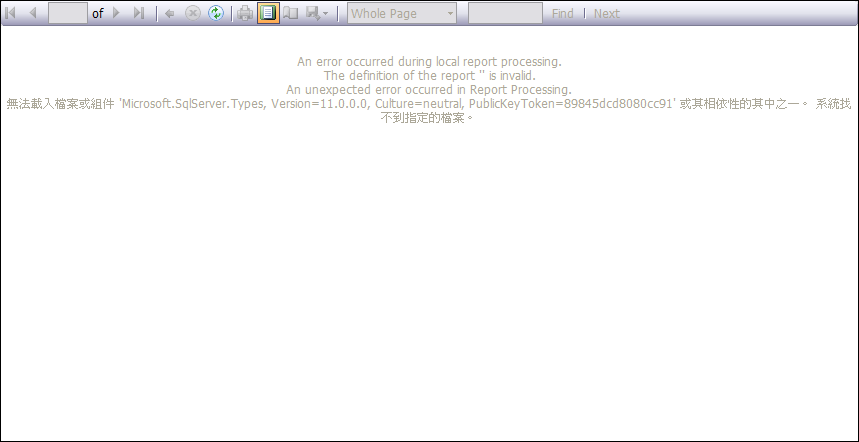
reportviewer

After I copied Microsoft.SqlServer.Types.dll to my application folder on the deployment machine. It showed next message that it want Microsoft.ReportViewer.ProcessingObjectModel.dll. And then copy it. Finally an empty report showed up. So I change my code to open the normal report which it was be. It works! All reports show up well on deployment machine now.

Final thoughts

Usually I only copy Microsoft.ReportViewer.Common.dll and Microsoft.ReportViewer.WinForms.dll to deployment machine when using ReportViewer version 10. This time I changed my ReportViewer to version 11 and got this error message “The definition of the report '' is invalid”. I googled everywhere but no useful solution for my case. Although someone mentioned it was ReportViewer version issue. But I still don’t know what’s the key point about version issue or what assembly missed in my application. Well, if you has the same problem, report works well on develop machine but not on deployment machine, try this solution.

2009/07/07

在微軟報表檢視器加入自訂程式碼 實例說明

加入程式碼的 MSDN 說明請參考: Adding Custom Code to a ReportViewer Report

在製作報表的時候,客戶有一個需求,假設資料的內容如下:

班號
(ClassNumber)
學生姓名
(StudentName)
001 王大明
001 陳小華
002 李大丙
002 吳小菁
003 張小英

希望輸出的報表的時候,重複的班號不要顯示,如下:

班號 學生姓名
001 王大明
  陳小華
002 李大丙
  吳小菁
003 張小英

在一般製作報表的時候,班號的這個欄位會填上 Fileds!ClassNumber.Value 的內容,但要怎麼才可以濾掉重複出現的班號呢? 使用自訂程式碼。

展開 Visual Stuio 的命令選單 Rport –> Report Properties,選擇 Code 頁籤,寫一段判斷式的函式。如下:

Dim tempClassNumber as String = ""
Public Function ShowClassNumber(ByVal classNumber as String) as String
    If (classNumber = tempClassNumber)
        Return ""
    End If
    tempClassNumber = classNumber
    Return classNumber
End Function

然後在設計報表的地方使用如下的 expression:

=Code.ShowClassNumber(Fileds!ClassNumber.Value)

客戶期望的報表內容就成功了。

自訂程式碼是動態地將程式碼編譯到報表內建的 Code 類別,以記事本打開報表設計 rdlc 檔案,可以在 <code> 區塊看到上面寫的程式碼。在報表的 expression 編輯器,使用 Code 類別來呼叫。有幾點要注意一下:

1. 必須先編譯一次專案才可以使用自訂的程式碼。
2. 在 expression 編輯器不會自動列舉自訂程式碼裡面的函式名稱。
3. 自訂程式碼必須以 Visual Basic 撰寫。